
A European alternative to Microsoft Teams

You look for a European alternative to Microsoft Teams usually for one of three reasons: you want to depend less on a single US supplier, you want chat, meetings and documents under one European roof, or you have a procurement question that needs a clean justification. CoVince is not a clone of Teams, but a European platform that combines the same core and adds journeys, boards, own editors and an AI CrewMate.
What people use Teams for
Usually four things: chatting in teams and channels, video meetings, working on documents together and sharing files. Teams also often hangs on the rest of the Microsoft 365 environment, with calendar, mail and storage. Anyone looking for an alternative should first write down which of those four things really happen every day. It often turns out to be less than expected: many teams mainly chat and meet.
What CoVince offers for that
- Journeys with chat: a journey is the place for a project or team, with chat, people, files and a timeline.
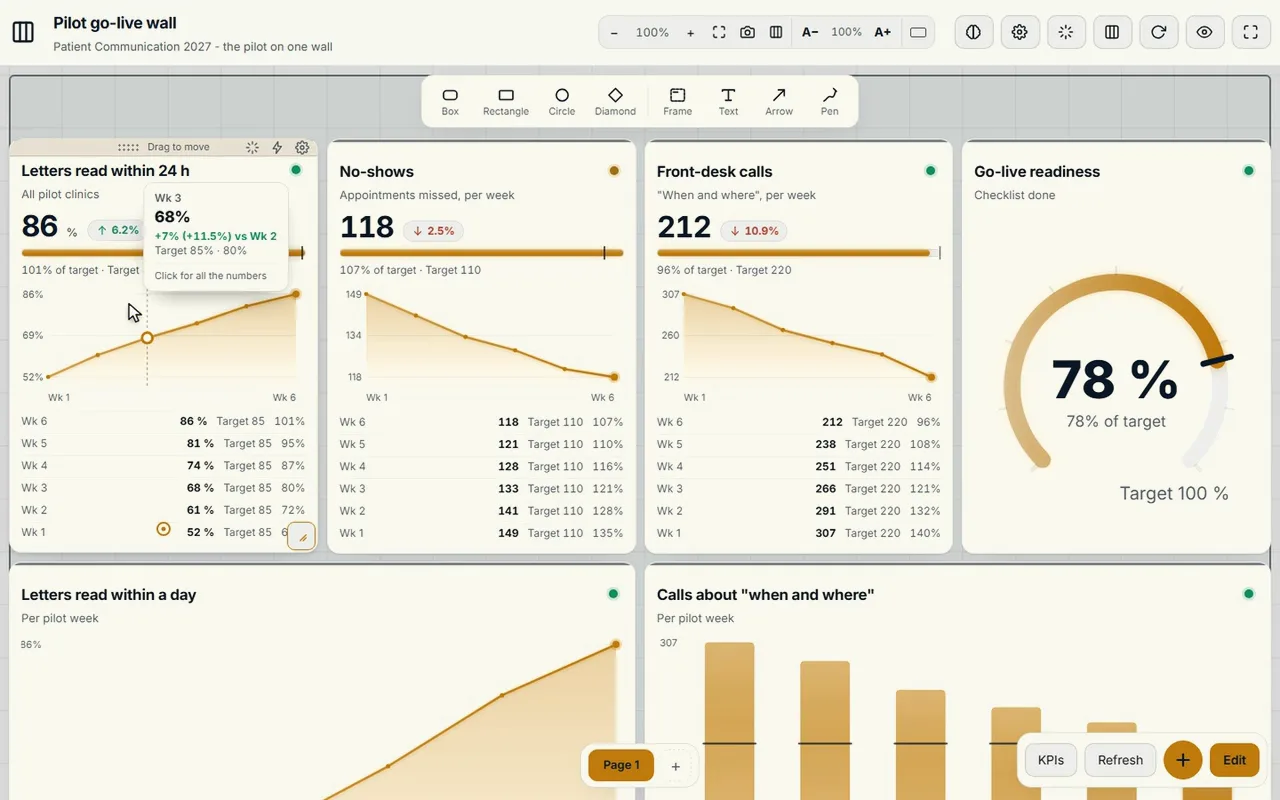
- Video calls from the journey, with the same live wall in view.
- Own editors for documents, spreadsheets (grids) and presentations.
- Boards: a canvas with actions and a timeline, and the Control Room with KPIs, also as a digital Obeya.
- CrewMate AI: an AI colleague whose model you choose, see alternative to Copilot.
- Access per organisation and journey, managed in one place.
Honest limits
CoVince does not promise a one-to-one replacement of everything that is interlinked in a Microsoft 365 environment. If you have deep integrations with other Microsoft products, it pays to move one team or project first and see what fits. We do not promise automatic migration.
The sovereignty story
Teams, like the rest of Microsoft, falls under US jurisdiction, also with data in an EU region, see the CLOUD Act of 2018. CoVince runs in Europe, with a European cloud provider and not a US hyperscaler, and is ISO 27001 certified. That does not remove your own responsibility for what you do with it: a platform does not make you compliant by itself. The full, honest status is on the main page.
An example: the Maintenance team of a housing association
Suppose a regional housing association with sixty employees. The Maintenance team, twelve people, works in Teams with one channel per neighbourhood, a weekly planning meeting and a shared folder with work orders. The director wants less dependence on one US supplier, but nobody wants maintenance to stall for a month.
The team starts a journey called "Maintenance 2027". The weekly planning takes place in a video call from that journey, with the board alongside on which every work order has an owner and a date. The chat per neighbourhood becomes a conversation per topic within the journey, so a decision about a leak sits next to the related action. After four weeks the team looks back: the planning has become shorter, because the actions are already on the board. What they miss, they write down for the demo: that is the input for deciding whether the rest of the organisation follows.
A move plan for one team
- Week 1: create the journey, invite the team and put the standing documents in.
- Week 2: hold the weekly stand-up in CoVince, with video calls and the board alongside.
- Week 3: move the action list and let chat about the project land there.
- Week 4: evaluate with the team: what works, what do you miss, what can be better?
Checklist before you start
- Which four or five Teams functions does this team really use every week?
- Who manages access, and who may invite guests?
- Which documents are still alive and must come along, which can go to the archive?
- Which links with other Microsoft products exist, and are they indispensable?
- What is the criterion on which you decide after four weeks?
Common mistakes
The first mistake is wanting to move everything at once: a whole organisation in one weekend. The second is making a channel-by-channel copy, which carries the mess of the old system along. The third is not appointing an owner for the trial, so nobody drives the evaluation. And the fourth is using the sovereignty argument without taking the user along: if the team sees no daily benefit, the trial is doomed.
What you take along, and what you leave
Take the documents and agreements that are still alive. Archive the rest in the old system. A clean start is often nicer than a copy of all old channels. You discuss export options beforehand in a demo, see also exit strategy.
Guests, rights and meeting with outsiders
Many organisations work with external partners: a contractor, an adviser, a municipality. In Teams that often runs through guest accounts that are never cleaned up. In CoVince you manage access per organisation and per journey: an external partner only enters the journey he is needed in and does not see the rest. Agree beforehand who may invite guests, and schedule a clean-up round every quarter. Meeting with outsiders works like meeting internally: the video call starts from the journey, so minutes, actions and files end up in the same place and nobody has to send an attachment afterwards.
What you do on Monday
Pick the team, appoint an owner for the trial, and schedule the demo. Also read how to set up chat per project and what the choice between a platform and separate tools means.
Frequently asked questions
What does CoVince replace of Microsoft Teams?
Chat, video calls, sharing files and making documents together, plus boards and an AI assistant in the same platform.
Is CoVince a Teams clone?
No. It is its own platform with journeys, boards and a Control Room. Whether it suits you depends on how you use Teams.
Can I replace Teams step by step?
Yes, start with one team or project. We do not promise automatic migration.
Where does CoVince run?
In Europe, with a European cloud provider, without a US hyperscaler. CoVince is ISO 27001 certified.
Does switching make me GDPR-proof automatically?
No. A European platform makes the assessment simpler, but your organisation stays responsible for a processing agreement, access and retention periods.
How long does a trial with one team take?
Count on about four weeks: setting up, moving a few fixed meetings and evaluating. Then you decide what else moves over.